How I Found 15+ Qualified Leads with MoClaw
I tested MoClaw on a real B2B ICP: 20 leads in 9 minutes, then a 17-minute audit refined them to 16 verified leads. Exact prompts and workflow inside.
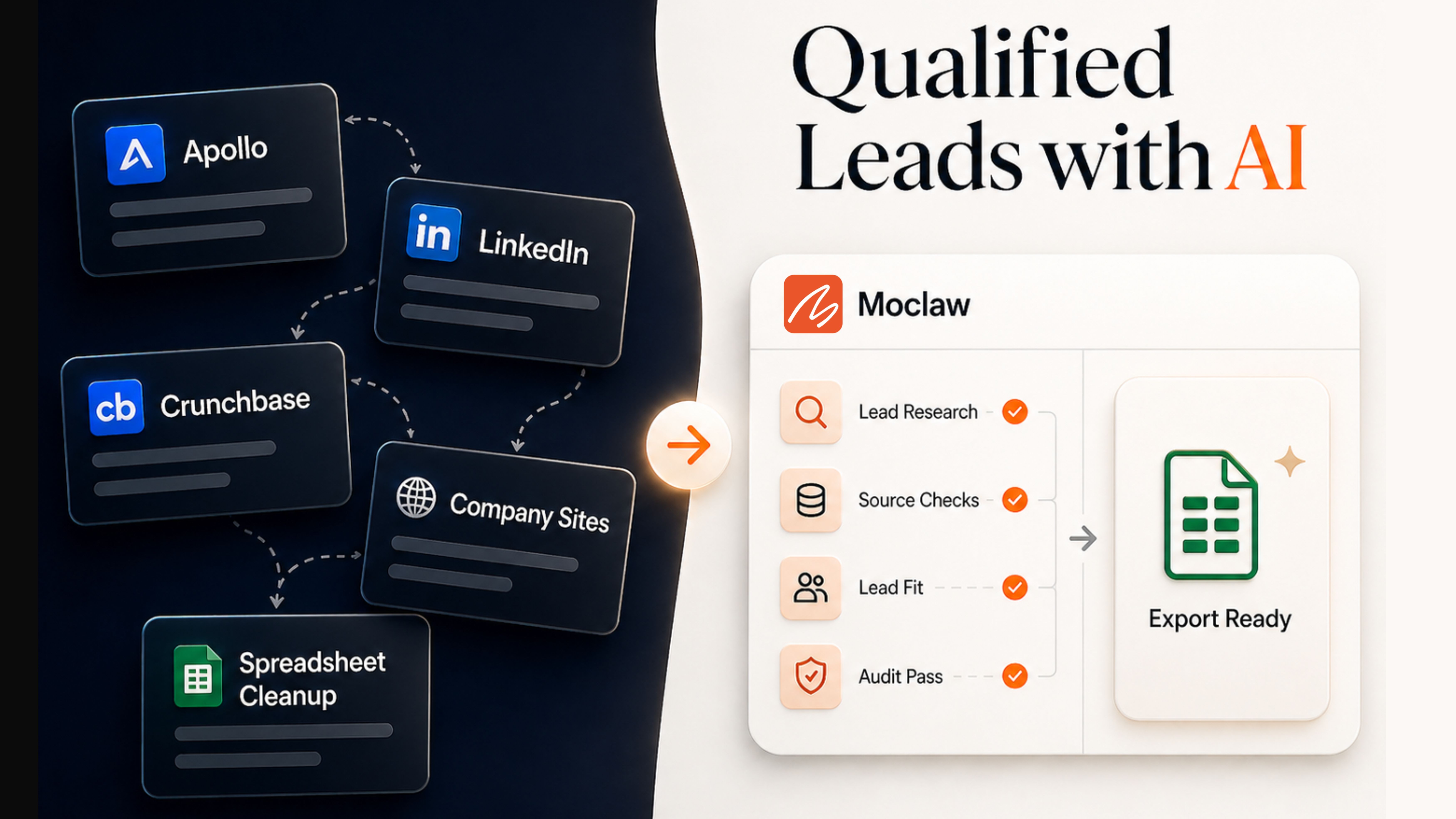
You can find qualified leads with MoClaw, run a verification audit on them, and deliver a sortable spreadsheet with source links in under 30 minutes for about 6,600 credits. In this write-up I share the exact two-prompt workflow (research prompt, then audit prompt) and where it still needed manual judgment.
Key Takeaways:
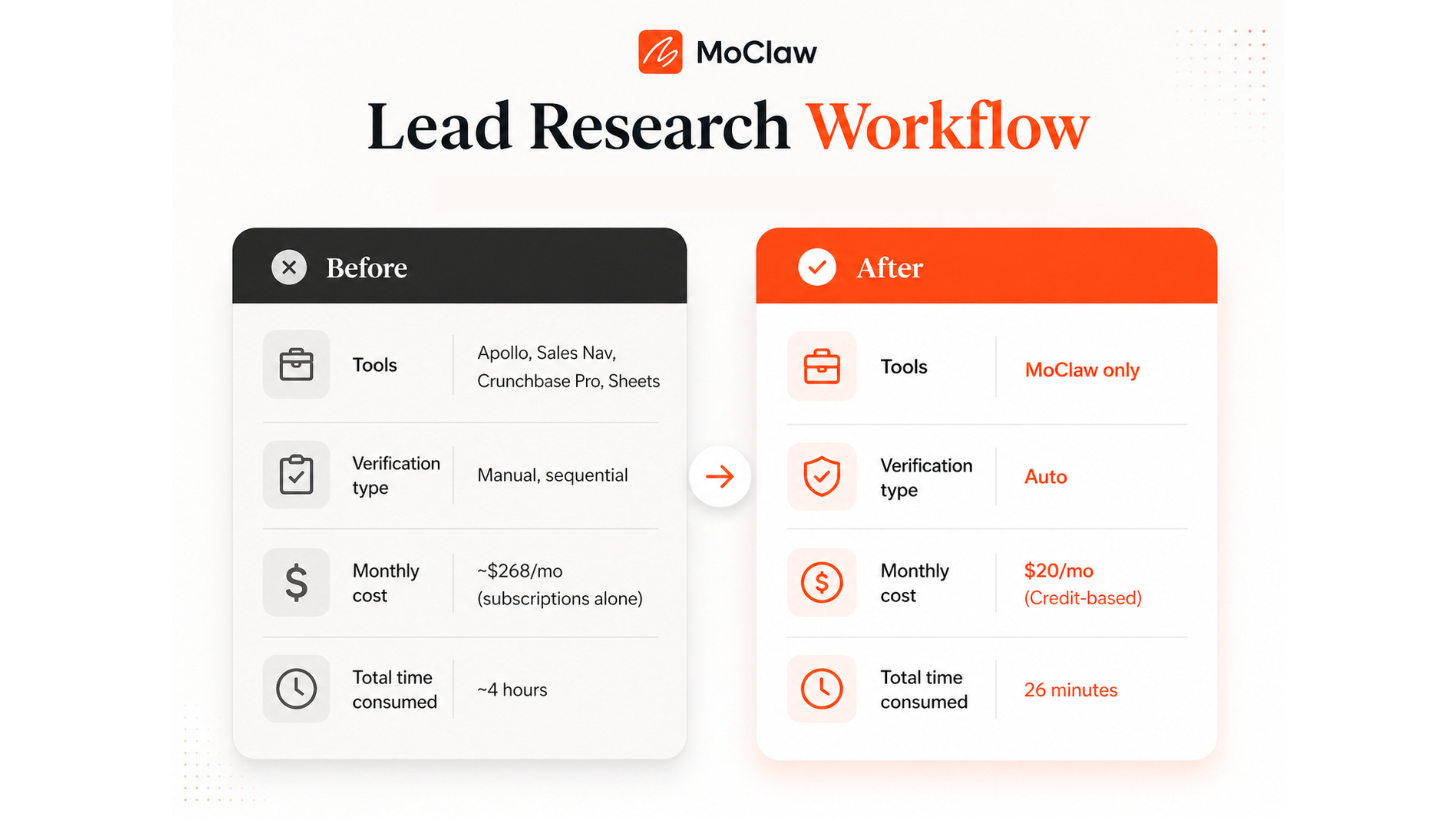
- Manual B2B lead research runs ~4 hours per 15-lead list across Apollo, Crunchbase, LinkedIn Sales Nav, and a $200+/mo tool stack.
- MoClaw's research prompt produced 20 directionally-strong leads in 9 minutes (~2,900 credits), including proactive exclusions like Notion, Copy.ai, and Drift.
- A separate audit prompt refined the list to 16 leads in 17 minutes (~3,700 credits), correcting headcount in 12 of 20 rows.
- The biggest instability: employee count and decision-maker titles. The audit added Confidence Level and Verification Notes columns so you can triage row by row.
- The prompt is adaptable. Customize company type, employee range, geography, and decision-maker titles. Keep the source rules and accuracy-first instruction intact.
More leads do not fix pipeline problems. They multiply them.
Most founders build their prospecting around volume. Bigger lists, broader searches, more exports. But a longer list just means more rows to check before you can send a single email. You can't verify them fast enough to know whether they're still worth contacting.
So I tested MoClaw on a qualified B2B lead research task to see if this AI agent could close that gap. I wanted a shorter list with fewer bad fits and less cleanup. That is what this write-up is about: how close AI can get you to a list you can trust.
The Lead-Research Tax Lean Founders Keep Paying
You get a list from Apollo. The real work starts after the export. You pull a name, open LinkedIn, and check whether the VP of Marketing is still in the role. Often they don't. A departure three months ago, a promotion, a replacement who hasn't updated the page yet.
Then Crunchbase becomes the next check. Is the company still independent? Is the funding current? Does the growth story still hold up?
Next, you open the company site. It tells you what the database cannot: whether the business is active, hiring, and still shipping.
And that is just one lead.
Scale it to fifteen, and the process becomes tab juggling by the numbers. Four tabs per company, fifteen companies, sixty back-and-forth checks. You get stuck in a stop-start cycle where most of your time goes into proving the list is real.
Here's the breakdown:
| Step | Tool | Typical Time |
|---|---|---|
| Filtered company search | Apollo | 15 to 20 min |
| Company verification (x15) | Crunchbase Pro | ~100 min |
| Decision-maker role check (x15) | LinkedIn Sales Navigator | ~40 min |
| Funding cross-reference (x15) | Crunchbase + press | ~60 min |
| Exclusion filtering | Manual judgment | 20 to 30 min |
| Spreadsheet + source links | Google Sheets | ~20 min |
| Total | ~$200+/mo | ~4 hours |
The real tax is paying for the stack, then paying again with your time to verify what the stack never really settled.
That number varies by market and ICP. Maya, a 2-person B2B fintech founder targeting credit unions, used to spend Mondays tab-juggling Apollo, LinkedIn, and Crunchbase to assemble a 15-row outreach list. Each Monday cost her about 4 hours and roughly $230 of stack subscriptions, only to discover that 4 or 5 of her contacts had already left the role.
The bigger point is simpler: manual lead research is less about finding names and more about clearing doubt. That was the gap I wanted to test, and the broader shift toward agents replacing point tools is mapped out in How AI Automation Evolved: From Zapier to Adaptive Agents. Not whether MoClaw could find companies, but whether it could do enough of the messy verifications to minimize the manual headache.
What the manual workflow proved: the real bottleneck is verification, not discovery.
What it left unsolved: how to compress the verification step without paying for a fourth subscription tool.
How to Find Qualified Leads with MoClaw
I gave MoClaw one narrow job: find qualified leads matching my ICP and return them in a spreadsheet I could actually use.
The task sounds simple until you see what it actually requires. Most tools stop at research. Very few can verify the details, rule out bad fits, and deliver something usable without being told what to do at every step.
The Prompt I Used
The prompt defined who counted as a fit, which sources were acceptable, what the spreadsheet had to include, and what the agent was not allowed to invent. In a task like lead research, those constraints matter as much as the tool itself.
Here is the exact prompt I used:
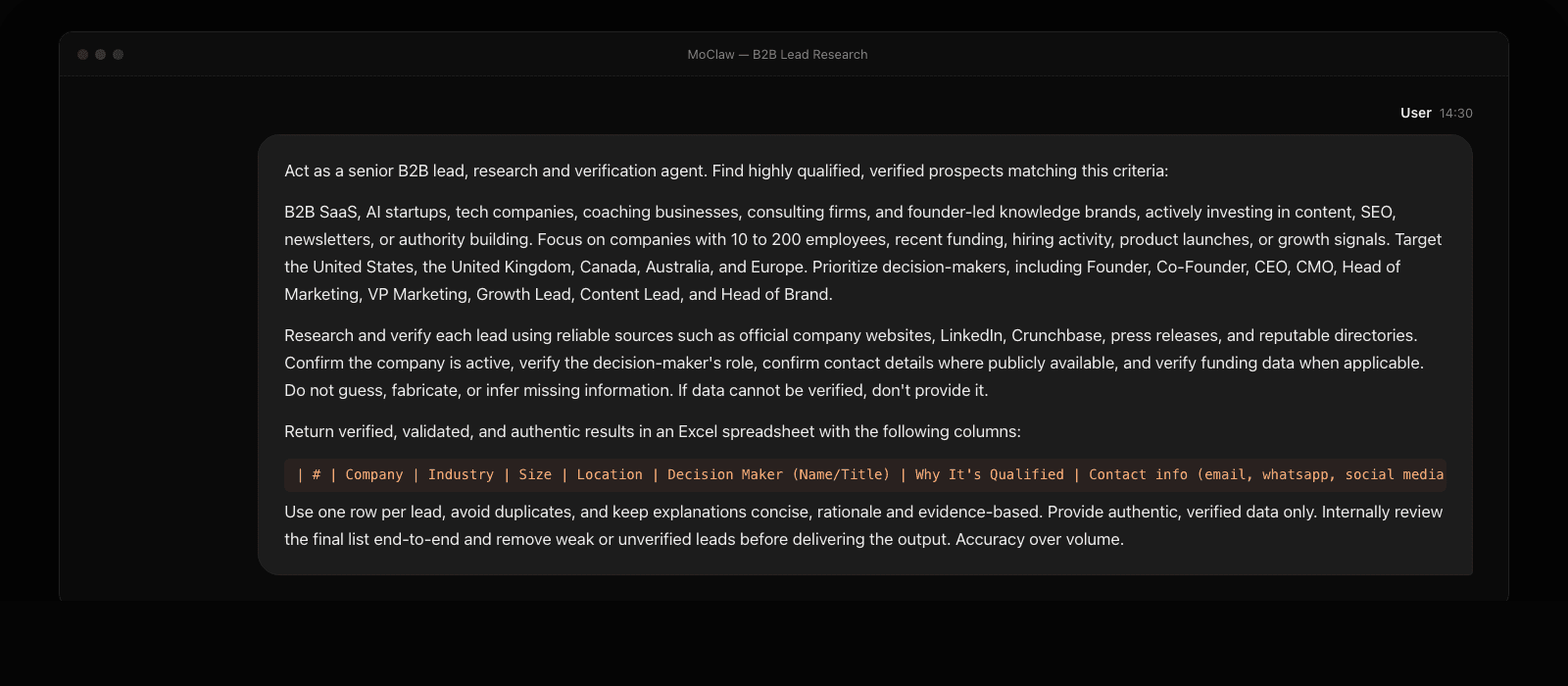
The prompt had a lot in it. Two parts did the heavy lifting. First, the source rule made it clear which databases MoClaw could trust. Second, the instruction to remove weak or unverified leads before delivery. Without those two constraints, this becomes a prettier list builder, not a research workflow.
What MoClaw Did While I Waited
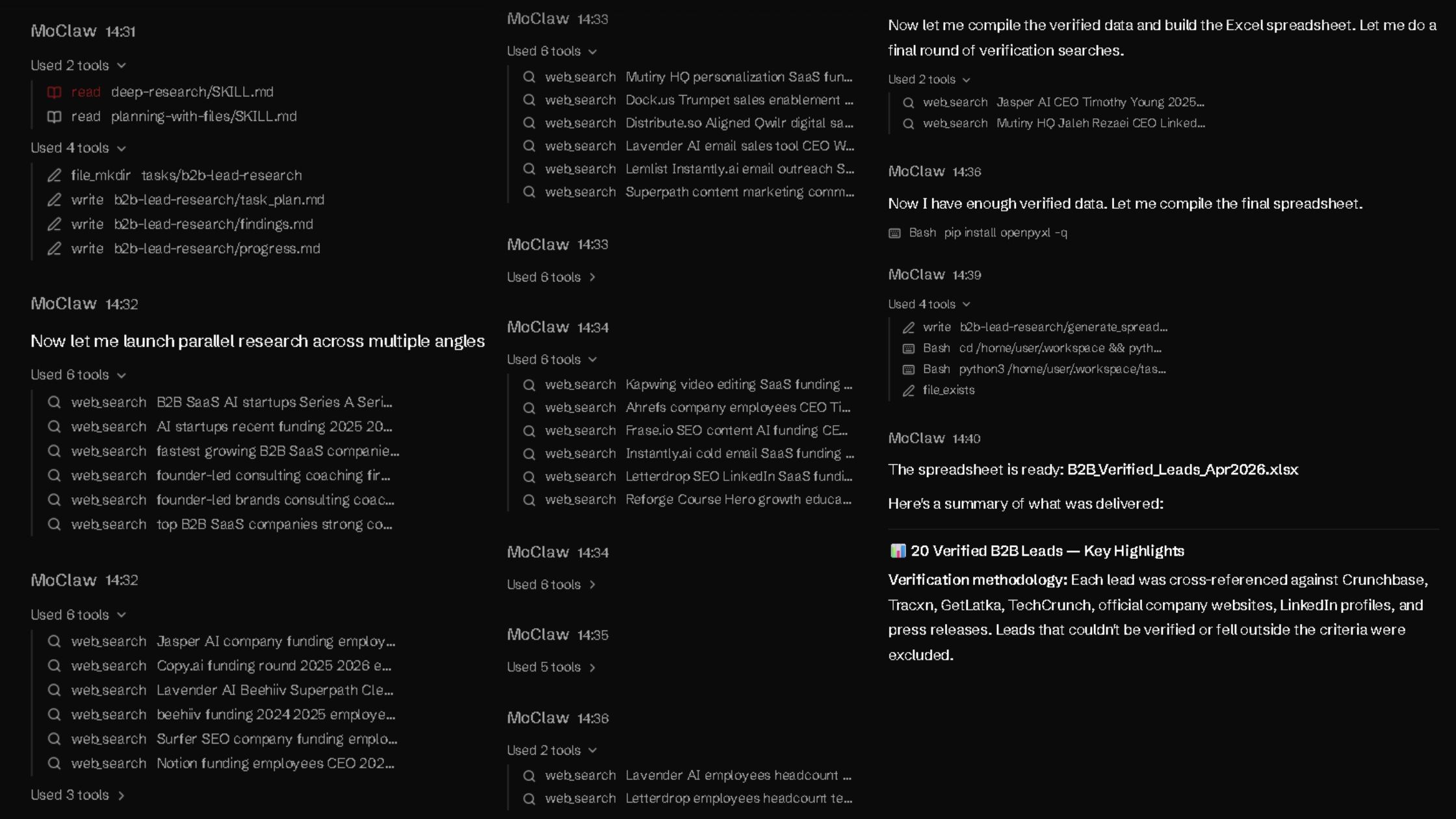
In the first minute, MoClaw did not start by filling rows. It organized the task first, then moved into research. That mattered because the job was not just to find companies. It was to verify fit before anything made it into the sheet.
The next five minutes went into parallel research and filtering. MoClaw searched from multiple angles, checked company fit, and pressure-tested decision-maker details before compiling the data.
Final checks and export took the last three minutes. From prompt to spreadsheet creation, the full process took about nine minutes and used almost 2,900 credits.
What Came Back
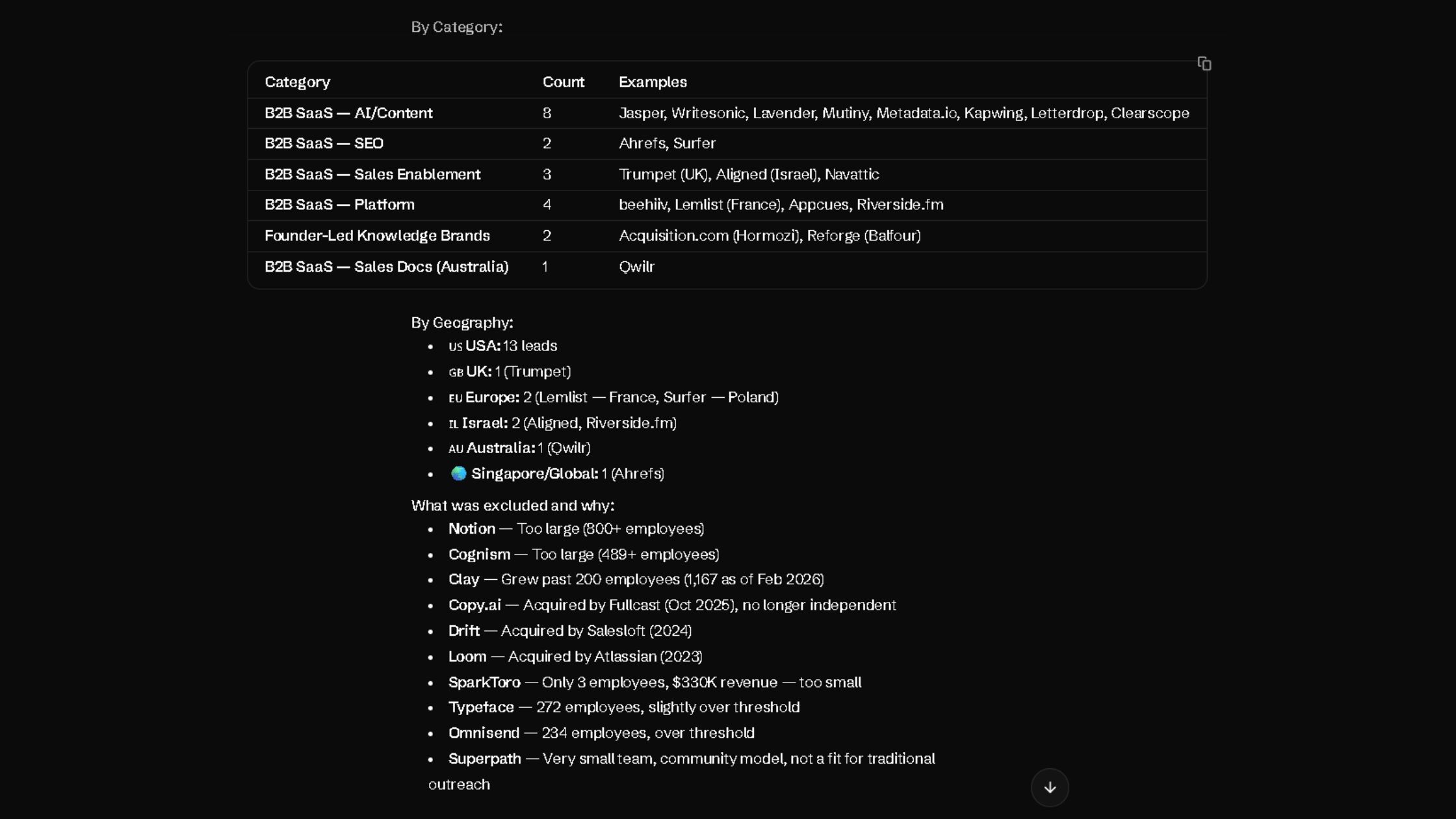
The result was 20 leads in the exact 10-column format I asked for. That only told me MoClaw could follow instructions. What mattered more was the file itself: a sortable, auditable spreadsheet with source links, decision-maker details, and a clear qualification reason for each row.
The set included Beehiiv, Mutiny, Navattic, Metadata.io, and Qwilr, among others.
More importantly, MoClaw was already filtering out weak fits before delivery. It excluded multiple leads: Notion (800+ employees), Copy.ai (acquired by Fullcast in October 2025), Drift (acquired by Salesloft in 2024), SparkToro (3 employees), Typeface (272 employees), and Superpath.
The output was quick, structured, directionally strong, and honest about its limits. The question was whether it would hold up under pressure.
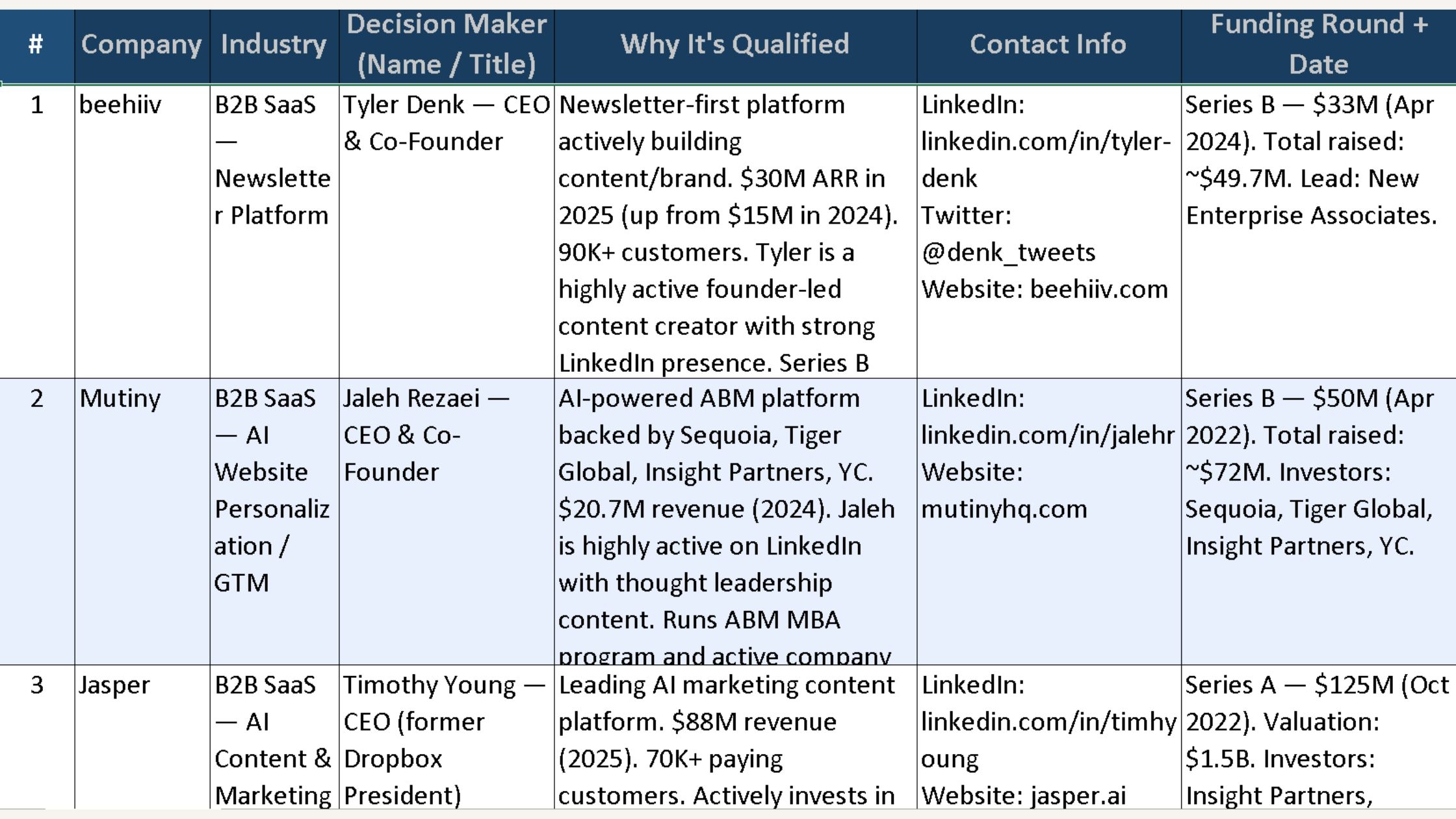
What the first run proved: one prompt with explicit source rules and an exclusion-first instruction can replace the multi-tab discovery phase.
What it left unsolved: whether the rows are actually verified enough to send a cold email against. That answer comes from the audit pass.
Running the Audit
Why I Audited It
AI can be directionally right and still operationally risky. That is enough reason to verify before using it. Here are the kinds of errors that slip into outreach before you catch them:
- A slightly outdated title.
- A funding round that happened much earlier than the spreadsheet makes it look.
- A company that looks active until you find the acquisition note buried in a press release.
Clean-looking lists fall apart on first contact. When they do, the damage is way more than time. It is the credibility of every message sent before the error surfaced.
Once I reviewed the spreadsheet, I gave an audit prompt to separate the solid leads from the shaky ones.
The Audit Prompt
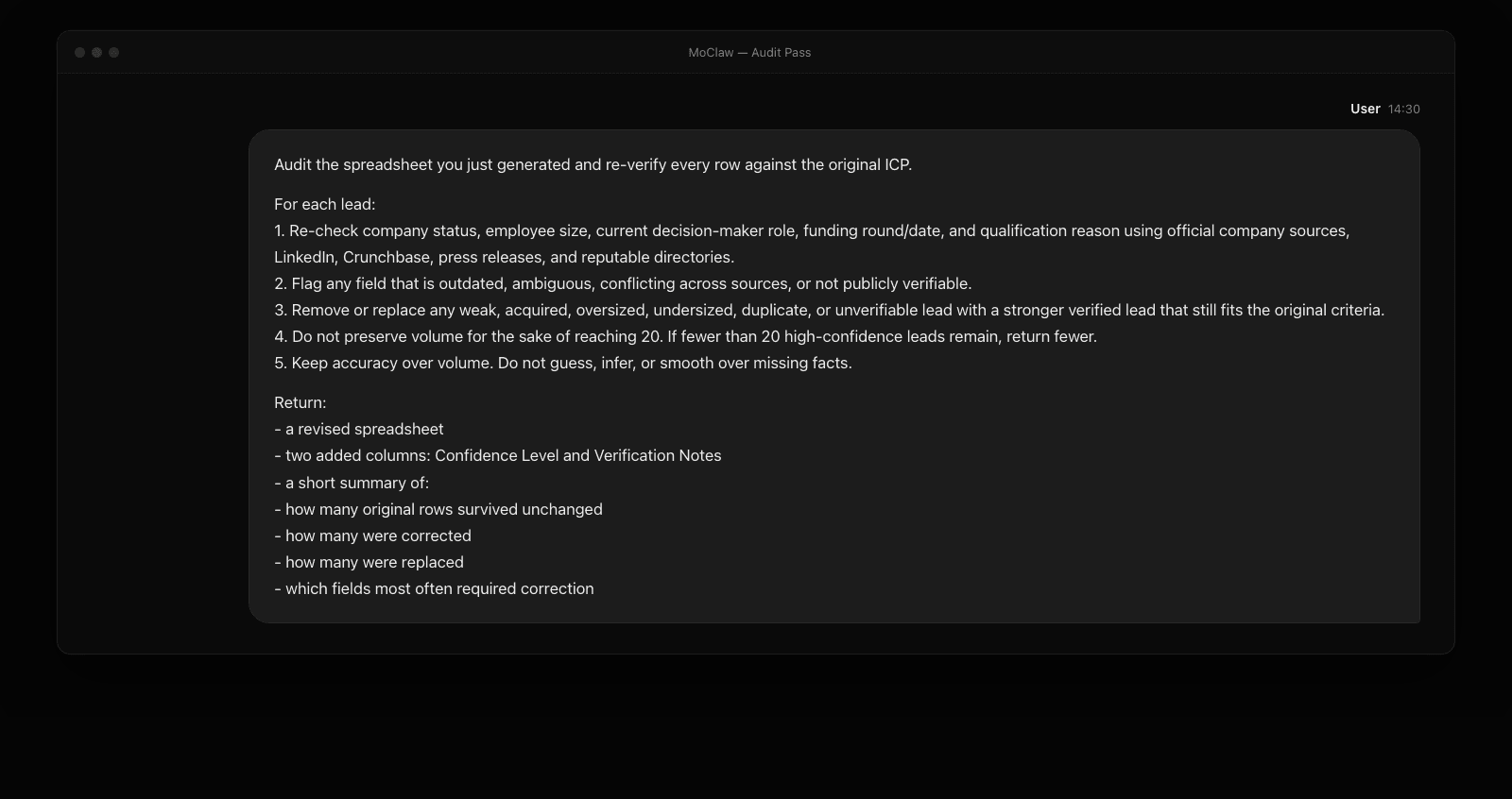
The audit took about 17 minutes and consumed 3,700+ credits.
The first two minutes were spent re-checking the original sheet. The next eight focused on filtering weak entries and finding replacements. The final seven covered verification, confidence scoring, and rebuilding the sheet.
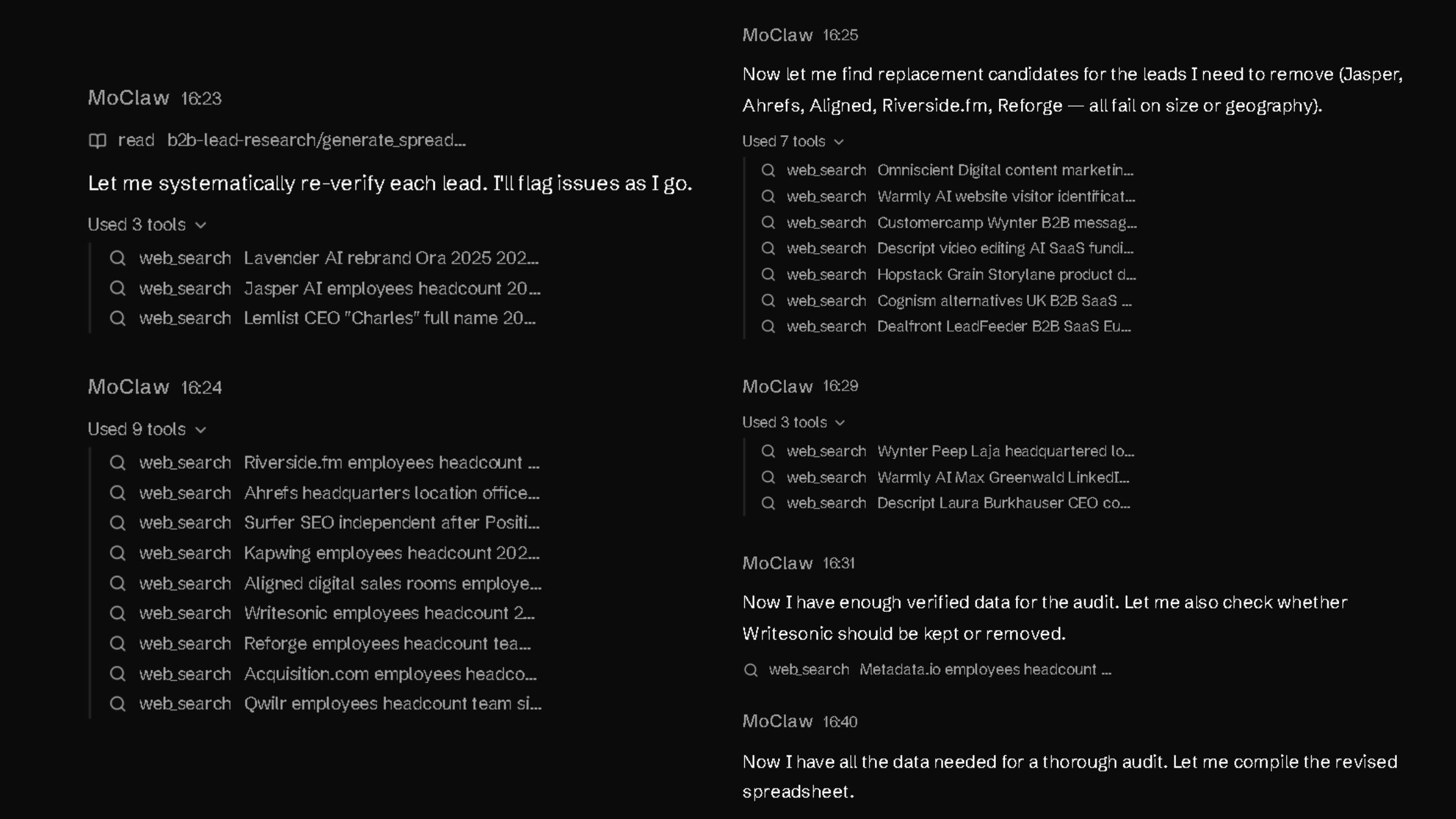
What came back was a refined list, with every weak row either corrected, replaced, or removed.
What Changed After the Audit
Four leads survived unchanged: Beehiiv, Mutiny, Navattic, and Trumpet.
Nine were corrected. Three new leads were added: Descript, Wynter, and Warmly. Seven were removed entirely.
That shift revealed how much cleanup was still hiding inside a good-looking first sheet.
The final count was 16 leads. Nine were high-confidence. Six needed a quick manual check. One stayed flagged because the public headcount data would not settle cleanly.
That is a reliable list I'd actually be using.
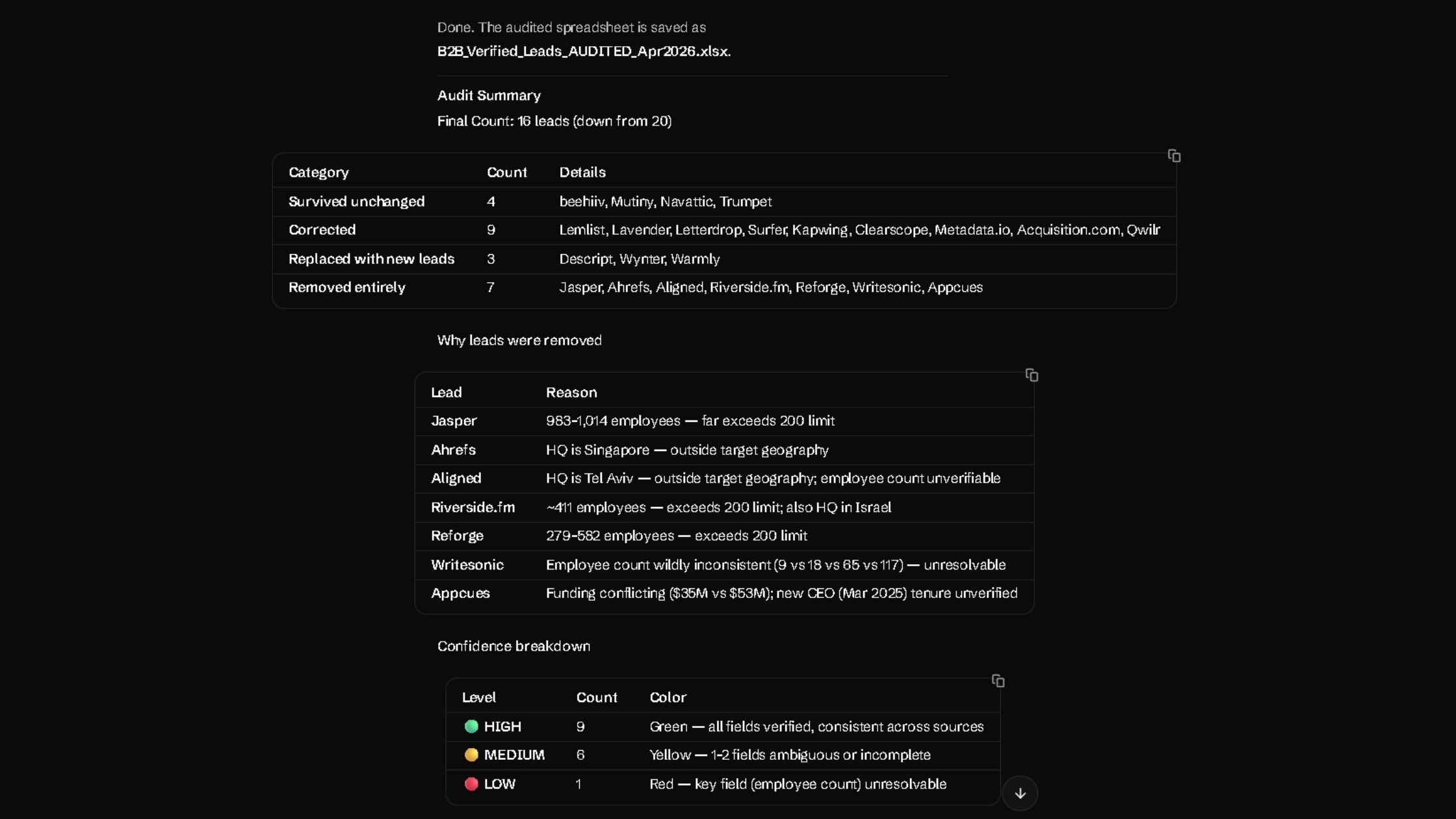
Why Certain Leads Were Removed
The removals were not cosmetic. They were exactly the kinds of issues that make a lead list look better than it really is.
- Jasper was an easy cut once the size check came in.
- Ahrefs fell outside the target geography.
- Riverside.fm failed on both headcount and HQ.
- Reforge had simply grown beyond the threshold.
- Appcues had unverified funding and leadership details.
Every one of those leads looked plausible in the original output. That is the point. Plausible is not the same as verified.
What the Audit Exposed
Employee count turned out to be the most unstable field. That matters because size was part of the ICP, not background context. In the audit, headcount was the field most often corrected, affecting 12 of the 20 original rows.
Leadership verification mattered for the same reason. The wrong title does not just make a row messy. It changes who you reach out to. The audit found ambiguous or incorrect decision-maker data in multiple rows, including Surfer, Lemlist, and Descript.
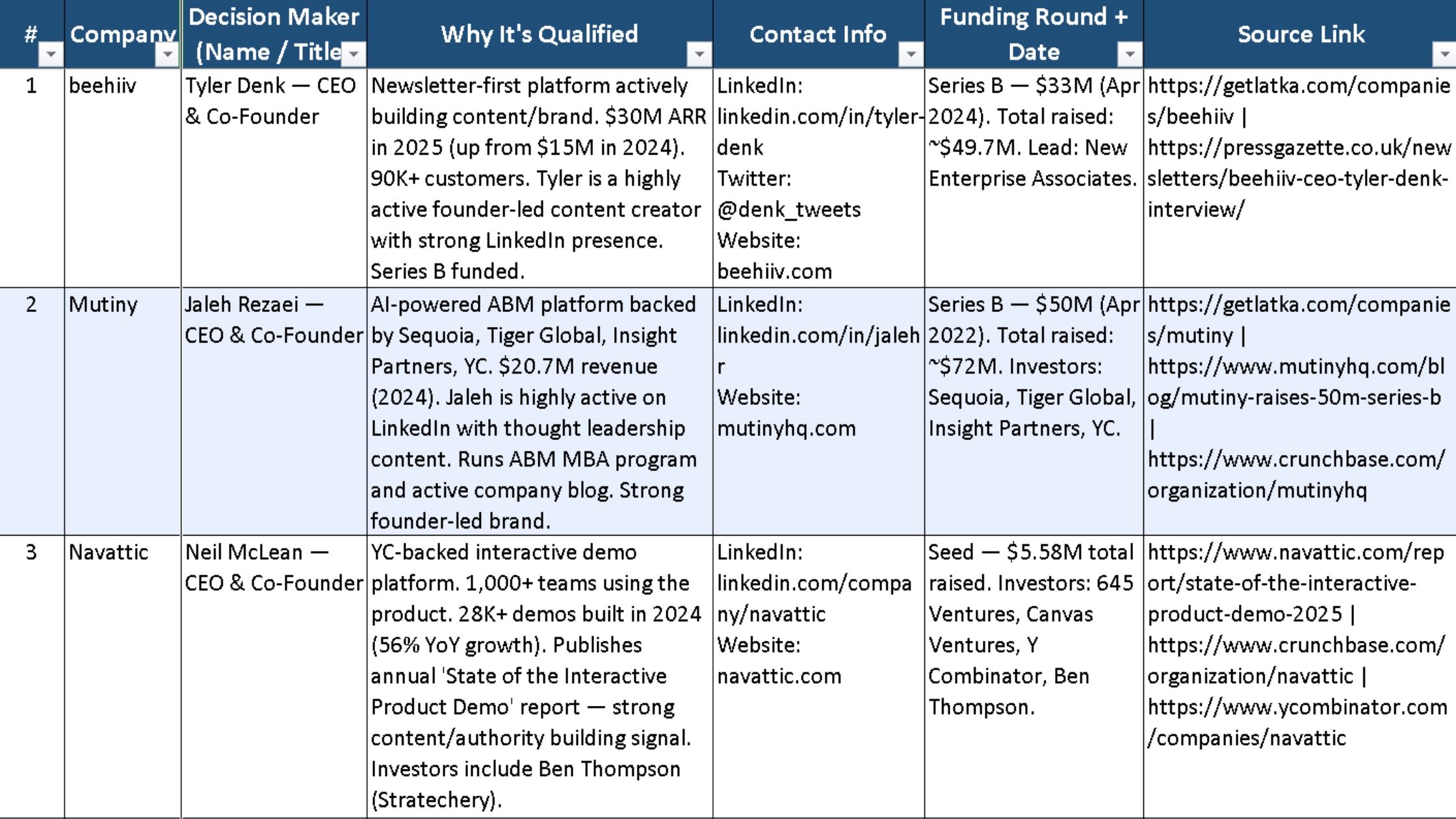
The audit also added two useful columns: Confidence Level and Verification Notes. Those columns updated the sheet from a list into a decision tool. Instead of pretending every row was equally solid, the spreadsheet showed where the evidence held and where it started to wobble.
That is why the audit mattered. It surfaced the messy parts instead of hiding them behind clean formatting.
What the audit proved: a separate verification pass catches the rows the first prompt could not. The Confidence Level and Verification Notes columns turn the spreadsheet from a list into a triage tool.
What it left unsolved: the small percentage of rows where public headcount disagrees across sources. Those still need a human eye and 90 seconds of cross-checking.
How to Adapt This Prompt for Your ICP
You do not need to rewrite the whole prompt. Just customize the four parts to match your requirements.
Four parts to customize:
- Company type. Replace the current company list with the kind of businesses you want to target.
- Employee range. Set the size range that fits your offer.
- Geography. Limit the prompt to the countries or regions you actually sell in.
- Decision-maker titles. Use the job titles that match your real buyer.
Keep these intact: research rules, the source checks, and the accuracy-first instruction.
Here's the fill-in template:
Act as a senior B2B qualified lead research and verification agent. Find verified prospects that match the following criteria:
[Company type block]. Focus on companies with [employee range] employees, [growth signals]. Target [geography]. Prioritize [decision-maker titles].
Research and verify each lead using [source types]. Do not guess, fabricate, or infer. Accuracy over volume.
Then run the audit prompt against the same list to catch the weak rows.
Ben, a freelance growth consultant who only works with seed-stage two-sided marketplaces in EMEA, swapped the company-type block for "two-sided marketplaces with a transactional GMV model," narrowed employee range to 5–25, and changed decision-maker titles to Head of Operations and Founder. His first run returned 18 leads in 11 minutes for about 3,100 credits, and the audit pass dropped 3 of them. He kept 15 high-confidence rows from a single afternoon.
What the template proved: four named slots (company type, employee range, geography, decision-maker titles) cover most ICP variations without rewriting the prompt.
What it left unsolved: specialized buyer signals like "recently raised a Series A" or "recently hired a VP of Sales." Those need an extra pass or a custom audit prompt, the same pattern cheap frontier inference makes routine, as covered in Why DeepSeek V4 Pro Is a Game-Changer for AI Agents.
Where Human Judgment Still Matters
MoClaw shortened the process, but it did not remove the human from it. Three places still needed me.
- The ICP itself. The agent can only verify against criteria you give it. The judgment of "is this actually the buyer we can win" is still mine.
- Edge-case headcount. The one lead that stayed flagged after the audit was a company with conflicting public headcount numbers. Deciding whether to keep or drop that row needed me looking at press coverage, LinkedIn, and their own site.
- Tone and angle of the outreach. Pulling leads is not the same as knowing what to say. A verified list is only useful if the first email is worth reading.
So the workflow is not "AI does lead research." It is "AI compresses the verification step so I can spend time on ICP and message, not tabs."
What the limits proved: AI compresses verification but does not replace ICP judgment, edge-case research, or outreach craft.
What they left unsolved: the message itself. A trustworthy list is wasted on a forgettable cold email.
My Final Take on MoClaw for Qualified Lead Research
What stayed with me after this test was the feeling that qualified lead research finally started in the right place.
Most of the time, lead research slows down after the list is built. You still have to verify size, leadership, fit, and company status before you trust a single row. MoClaw did not solve all of that, but it clearly reduced the volume of cleanup.
That makes it worth testing on your own ICP, especially if your current process still lives across exports, tabs, and manual checks.
What the experiment proved: lead research is a quality problem more than a volume problem, and AI verification is the cheapest way to fix the quality side.
What it left unsolved: whether the same two-prompt workflow holds up at 100+ leads instead of 15. That is the next test.
FAQ
How do I know if a lead list from AI is actually safe for cold outreach?
No source link means no way to confirm the data. A lead should clear three checks: the title is verifiable, the company is active, and the row has a verifiable source link. You can't afford to depend on guesses.
What prompt structure works best for lead research?
The strongest structure is simple: ban guessing, define the ICP, sources, and output fields, and instruct the agent to remove weak or unverifiable rows before delivery. Then run a separate audit prompt against the same criteria.
What should I do with leads flagged as medium or low confidence?
This is where verification matters most. If a lead seems genuinely worth pursuing, verify it with AI, manual review, or both. If it does not justify the extra check, cut it.
How many credits does this whole workflow use?
The research prompt used ~2,900 credits over 9 minutes. The audit prompt used ~3,700 credits over 17 minutes. Total: ~6,600 credits for a verified 16-lead list. Subsequent runs on a new ICP land in the same range.
Run your own ICP through this prompt. Start with MoClaw, paste the template, and see how close your first list gets to being outreach-ready.
We test automation patterns inside MoClaw and publish what works (and what doesn't). Specific use-case breakdowns, workflow templates, and step-by-step playbooks.
Ready to automate with AI?
MoClaw brings AI agents to the cloud. No setup, no coding required.
References: Apollo - Sales Prospecting Database · Crunchbase - Company Intelligence · LinkedIn Sales Navigator · MoClaw - AI Agent Platform · Beehiiv - Newsletter Platform · Mutiny - Website Personalization · Navattic - Interactive Product Demos · Trumpet - Digital Sales Rooms · Descript - Audio/Video Editing · Wynter - B2B Market Research · Warmly - Signal-Based Sales · Jasper - AI Content Platform · Ahrefs - SEO Tools · Surfer - On-Page SEO · Lemlist - Outbound Email